



 Updated
Mastering market direction through technical and fundamental analysis is only the first step; capturing that move requires precise execution. This brings us to the crucial topic of forex orders—the specific instructions you give to your broker to enter or exit a trade.
In this article, we will break down the different types of forex orders available, ranging from the immediate execution of a market order to strategic pending orders. Whether you are a scalper needing speed or a swing trader needing precision, choosing the right order type is vital for optimising your entry price and managing risk effectively.
What Are The Different Forex Order Types?
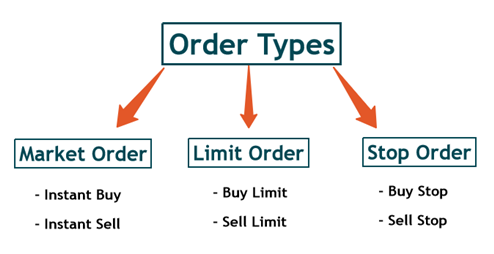
When entering a trade in the forex market, you’ll generally use one of three order types: market orders, limit orders, or stop orders. A market order is executed immediately at the best available price. Limit and stop orders, on the other hand, are pending orders—they only trigger later, when the price reaches the level you’ve set.
Instant Execution: The Market Order
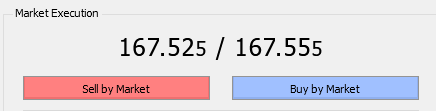
As the name implies, this implies instant action. When you place a market order, you are instructing your broker to execute a Buy or Sell position immediately at the best available current price.
Why use it?
Among the different types of forex orders, this one is designed for pure speed. It is particularly useful for traders who spot a breakout or a trend and need to enter the market right now to capture the move.
But there is a catch.
The forex market is incredibly volatile, and prices can shift in milliseconds. Because the order is executed on a real-time basis, there will be instances where your trade is filled at a slightly different price than the one you intended. This phenomenon (known as slippage) is a crucial risk to keep in mind when using forex orders during high-impact news events.
Precise Entry: The Limit Order (Pending Order)
Want a better price than what is currently available?
Enter the Limit Order.
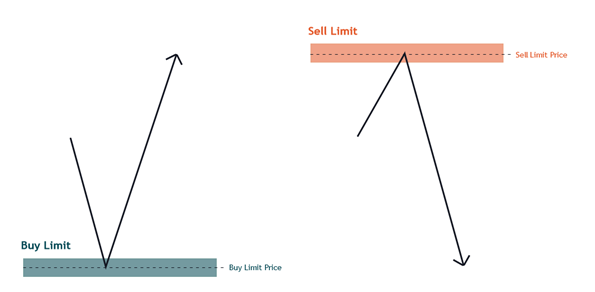
Unlike a market order, which prioritises speed and executes immediately, a limit order prioritises price.
A limit order in forex waits for the market to come to you. The trade will only execute if the price reaches your pre-defined level. This means you will never pay a cent more than your limit price; in fact, it is possible to get filled at a price better than what you set.
Why use this approach?
Limit orders are perfect for traders aiming for the sharpest entry possible.
Because these are set-and-forget forex orders, they do not require constant attention. You can plan your trade, set your limit, and walk away, knowing the position will only open if the market hits your target. Just remember: if the price turns around before hitting your level, the order simply remains unfilled.
Momentum Entry: The Stop Order
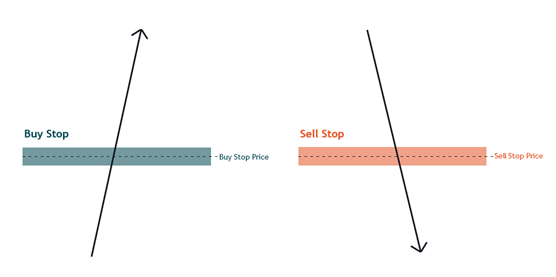
Sometimes, you want the market to prove it is moving before you jump in.
Enter the Stop Order.
While limit orders are about buying low and selling high, this type of forex order follows a different logic: buy high to sell higher, or sell low to buy lower.
Traders use stop orders to confirm that the market is actually trending in their favour. You are essentially telling your broker: “Don’t open this trade until the price pushes through this specific level.”
How does it work?
A Buy Stop is placed above the current price (anticipating a breakout upward), while a Sell Stop is placed below the current price (anticipating a breakdown).
Once your specific price level is reached, your stop order is executed. This ensures you enter the trade immediately to catch the momentum, making these forex orders a favourite tool for breakout traders who don’t want to miss the bus.
Place a Forex Order with Vantage
Ready to place a forex order? Here is a quick guide to place an order on the Vantage platform:
- Go to the Markets tab, ensure Forex is selected, and tap your chosen pair (e.g., EURUSD).

Image 1: Select Your Market - On the chart screen, tap Buy (Green) to go long or Sell (Red) to go short.
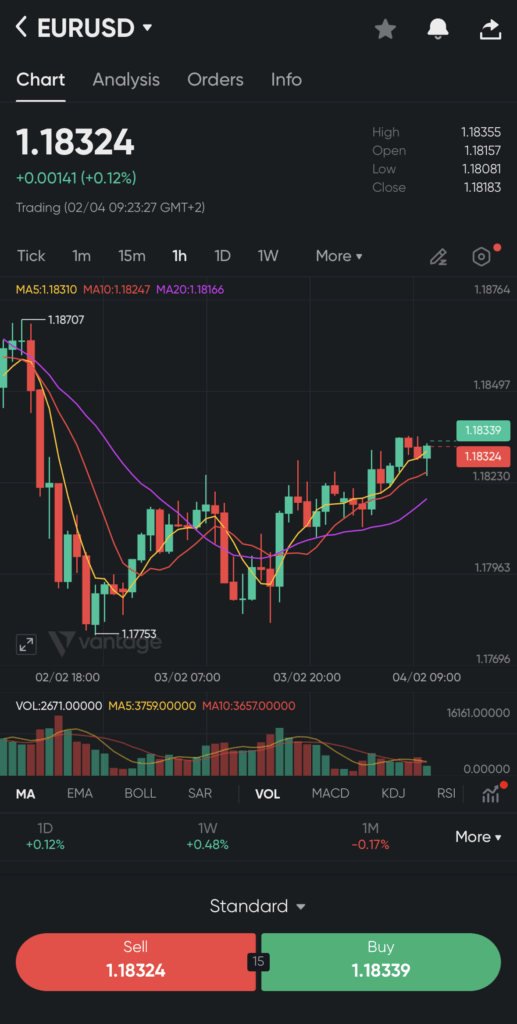
Image 2: Analyse and Choose Direction - The order panel will slide up. By default, “Market” execution is selected. If you need to set a pending order, tap the “Market” dropdown to switch to Limit, Stop, or Stop Limit.

Image 3: Select Order Type - Use the + or – buttons (or the slider) to adjust your Lot size (Volume). This determines the value of your trade.
- For a pending order, you can place a stop or limit.

Image 4: Place a limit - Tap the large “Buy” (or Sell) button at the bottom to confirm your trade.

Image 5: Execute the Trade
Conclusion
So, which Forex Order Is Right for You?
It depends on your trading style and goal. If you need instant execution, a market order may suit you. If you prefer to plan entries, limit and stop orders give you more control. Knowing when to use each order type helps you trade on your terms, rather than reacting to volatility.
Ready to practise? Trade CFDs with Vantage and test different order types on a demo account first, so you can get comfortable placing and managing trades before going live.